

D-Promos
Digital POP · Display screens

Displays in stores you don't own.
And they still run themselves.

Right now, when a display screen goes dark, nobody turns it back on until your rep swings by. With D-Promos, your screens stay on air, you change the campaign on every display from your account, and if one goes down, you get a heads-up on your phone or tablet.

Keep playing offline Recover if the video freezes Open and close with the store Alert you when one goes down
Fall Collection
Glow Serum
Brighter skin in 7 days
Your brand
On air
D-Promos
Micellar water
Lip balm
Eye cream
Facial toner
SPF 50 sunscreen
Hydrating mist
Clay mask
Body oil
Micellar water
Lip balm
Eye cream
Facial toner
SPF 50 sunscreen
Hydrating mist
Clay mask
Body oil
YOUR BRANDSkincare

Illustration: a counter display running the D-Promos player. Campaign video on top; product ticker along the bottom.

Why 'on' matters

The sale is decided in front of the display.

Five numbers, in order, each with its source.

  1. 176%

    of purchase decisions are made in the store.

    POPAI, Shopper Engagement Study, 2012.

    76%

    The decision happens in the store

  2. 214–20%

    A screen right next to the product sells 14% to 20% more.

    Grocery TV meta-study, 2024; SMG / Plan-Apps, 2025. Studies published by in-store media vendors.

    +14–20%

    Screen right next to the product

  3. 330%

    Yet according to Nielsen, only about 30% of in-store promotions run the way they were planned.

    Nielsen, as cited by Roamler ("retail promotional compliance as low as 30%"); original study undated.

    On USB

    3/10

    Only 3 of 10 show up as planned

  4. 4

    If your screen depends on someone turning it on or updating it, Nielsen is right.

    USB screen gone dark · print with an expired promo

    With D-Promos, two of these numbers work in your favor — and the third one's off the table.

    • On-screen at the moment of purchase decision.
    • Capture the sales lift of a screen right next to your product.
    • Campaigns executed as planned — verified with proof of play.
    76%+14–20%30%
    10/10

    10 of 10 on air, with proof of play

  5. 5

    With D-Promos you stop guessing: your screens stay on air, they alert you when they fail, and you can check what ran, whenever you want, from your cloud account.

    10/10

    10 of 10 on air, with proof of play

Figures come from the studies cited, measured in grocery and retail in the U.S., U.K. and Europe. They are not D-Promos measurements, and not your category.

Which one are you?

USB stick or printed signs, your display is costing you sales.

Two starting points, one problem: you depend on someone showing up at the store.

Already have screens?

You have the screen. Now you need someone to look after it.

Today

  • If it goes dark, nobody turns it back on.
  • Old content stays up until the rep comes by with the USB stick.
  • Already on a software tool? Does it alert you when a screen fails, and show you what played?

With D-Promos

  • Stays on air online or offline, and recovers on its own if the video freezes.
  • Change the campaign for every store from your account, with a start and an end date.
  • D-Promos Remote alerts you if a screen fails, and you get a compliance report for each one.
Still using printed signs?

Your printed sign doesn't know the promo is over.

Today

  • Every change means design, print, ship, and hope someone puts it up.
  • It tears, peels off, or goes up upside down, and nobody tells you.
  • The expired promo stays up until someone takes it down.

With D-Promos

  • No reprints, no shipping: change the campaign from your account.
  • Every piece goes live and comes down on its own, with a start and an end date.
  • A screen next to the product lifts sales 14% to 20% (Grocery TV 2024; SMG 2025).
They run themselves

Nobody has to go turn them on.

Three things the D-Promos player does on its own in every display, with nobody in the store.

Offline, still on air

They play from the copy saved on the device. If the store's network drops, the campaign keeps going.

Video freezes? They recover

The player watches that the video keeps moving. If it stalls, playback resumes without anyone touching a thing.

Open and close with the store

They turn on and off with the store's hours, in the store's time zone, where the device allows it.

And D-Promos monitors them 24/7

Screen monitoring is part of the service. It doesn't depend on someone on your team watching.

From your account

Change the campaign once. They all pick it up.

Upload and swap content from your D-Promos account in any browser. Pick which displays take it: all of them, one city, or a single screen.

Different by store

Every display can carry its own content: by screen, store, city, state or region.

Different by date

Every piece has a start and an end date. Schedule the season and it goes live and comes down on its own.

Campaigns with a QR code

Every piece can carry its own QR code, with its caption and its spot on the screen, on the same start and end dates.

Illustration of the flow; not the actual account interface.

Product ticker

Your heroes in the video. Your catalog in the ticker.

The campaign video shows your hero products. Underneath, the product ticker runs through your catalog with a photo and a name for each one.

Pick the layout for each display

Fall Collection
Glow Serum
Brighter skin in 7 days
Your brand
D-Promos
Micellar water
Lip balm
Eye cream
Facial toner
SPF 50 sunscreen
Hydrating mist
Clay mask
Body oil
Micellar water
Lip balm
Eye cream
Facial toner
SPF 50 sunscreen
Hydrating mist
Clay mask
Body oil

The player's ticker, up close: a photo and a name per product.

1

Photo and name per product

Every product scrolls by with its photo and its name, and the list loops without end.

2

With or without prices: your call

In third-party stores, most brands don't show prices, so nobody has to keep them in sync with the retailer. If you want them, the ticker and banners show them: enter them yourself or connect to a POS (Toast, Square, Lightspeed…) to pull each promo with its dates.

3

Optional per screen

Turn it on or off on each display. A display can run with just the video and the ticker, no side banners.

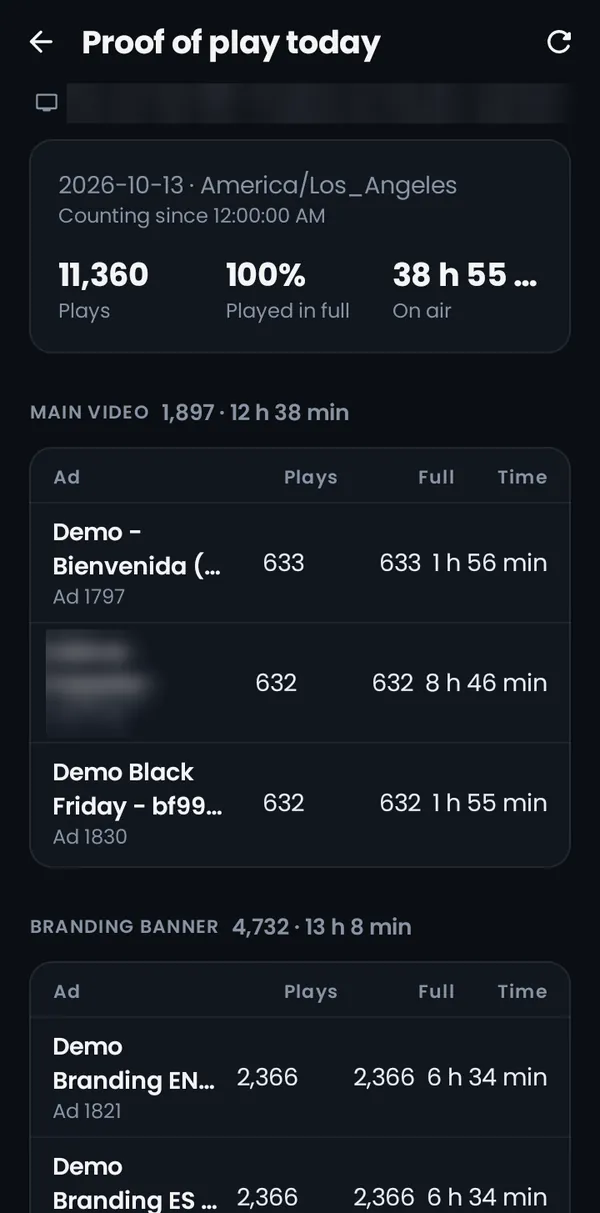
Proof of play today in the D-Promos Remote app: plays, played in full and time on air, per ad.

Real app screenshot from a test screen; internal data blurred.

Proof of play

Proof of play for your brand and for the store.

Every screen logs what played and how many times, and sends it to D-Promos. That's how you report to your brand and to the department store with data, not with your rep's word.

  • Plays per ad, per day
  • How many played in full, and how long the screen was on air
  • Every screen, on its own
D-Promos Remote

If something fails, it lets you know.

The D-Promos Remote app, on your phone or tablet, checks the screens on the network and alerts you when one stops working, and when it's back. Works on the store's network or over VPN.

Alert on your phone

With the app closed, your phone checks the screens on its network and alerts you if one stops working, and when it comes back.

Fix it from there

Relaunch the player, refresh the content and share a diagnostic with support.

Pause for maintenance

If a display is being serviced, pause its alerts for a while and the app shows it under maintenance.

Publish from your phone

A video, a banner or a last-minute notice on the screen you pick, in four steps.

On the store's network or over VPN. Control over the internet is not part of the app.

D-Promos Remote screens with sample data.

Digital POP FAQ

1

What happens if the store loses internet?

The display keeps playing from the copy saved on the device. When the connection comes back, it pulls the new content.

2

Who turns the screen back on if it goes dark?

The player turns on and off with the store's hours, where the device allows it, and if the video freezes it resumes on its own. If a screen still stops working, D-Promos Remote alerts you on your phone or tablet, and D-Promos monitors screens 24/7.

3

Can I run different content per store and per season?

Yes. You publish by screen, store, city, state or region, and every piece carries a start and an end date.

4

Can I show prices and promos?

Yes, it's optional. Enter them yourself, or connect the ticker and banners to POS systems like Toast, Square or Lightspeed so each promo's price and dates update on their own. In third-party retail, most brands choose not to show prices.

5

Does the app work from anywhere?

No. D-Promos Remote works on the store's Wi-Fi or over VPN. Content changes happen in your D-Promos account, in any browser.

6

Is Digital POP for selling ad space to other brands?

No. It's for your brand to promote its own products on its own displays.

Request a demo

You focus on selling.

Your displays run themselves. If something fails, you'll know. Request a demo and see it running.

The D-Promos Remote app works on the store's network or over VPN.

✓ 8 years in operation✓ 5,000+ screens✓ 6 countries